
About TU Mail
Outline of TU Mail
TU Mail has been switched to "Google Workspace for Education (hereinafter referred to as Google Workspace)" provided by Google since June 17th 2019.
In Google Workspace, the email function is "Gmail", and it can be used from anywhere on campus or outside with an internet communication environment and a browser.
In terms of functions, security has been enhanced such as antispam and antivirus programs, and there is no limit on the size of the mailbox, making it more secure and convenient than ever before.
Delivery address for notifications from each system.
| systems | Contents |
|---|---|
|
Faculty and Staff Groupware |
Delivery address for E-mail Notices |
|
Address listed at address book | |
|
Finance and Accounting System |
Delivery address for 支払通知書(Notification of Payment) |
|
Tohoku University Safety Confirmation System |
The delivery address of Safety confirmation messages |
【TUMail address is linked to each system】

Your TU Mail address
【About personal email address】
Email users
All the faculty and staff at Tohoku University have been assigned a TU Mail account, including temporary staff, research associates etc.
See the document below for detailed information.
・東北大メール利用対象者リスト
Email address format
Please refer to the Specification for creating your E-mail address.
Correcting your email address (If your name is in error)
Refer to Email address change in the Various applications menu.
You can continue to use TU Mail alias that are currently in use.
Please refer to Email alias from Menu for creating TU Mail alias.
【TU Mail Mailing list】
Mailing list format
Put .grp after the @ mark after “@”.
(e.g.)sample@grp.tohoku.ac.jp
Outline of Mailing list
・Use "Google Group".
→As before, the ML domain is “@ grp.tohoku.ac.jp”
and the TUMail administrator will register it by applying from the user.
→Add a mailbox to the mailing list. (You can have an unlimited mailbox
for the mail address)
→If a new person joins the group due to a change, past emails can be viewed.
→Email addresses other than “@ tohoku.ac.jp” can be registered.
・Provide only for faculty and staff, not for students
Please refer to Mailing list from menu for creating mailing list.
Specification
TU Mail provides MailSuite Google's Google Workspace for Education as an email service.
| Specifications of TU Mail | ||
|---|---|---|
| Email address format |
First name.Last name.Auxiliary@tohoku.ac.jp or First name.Middle name.Last name.Auxiliary@tohoku.ac.jp (e.g.)John Smith ⇒ john.smith.b3@tohoku.ac.jp ※The Auxiliary is a randomly generated two-character combination of a lowercase letter and a number. ※TU mail alias is not in this format. |
|
| Login ID・Password |
Login ID :TU Mail address Login Password:TU Mail address password |
|
|
Sending server (SMTP) |
Server name | smtp.gmail.com |
| Port | 465/tcp | |
| Security | SMTP over SSL | |
| Port | 587/tcp | |
| Security | TLS/STARTTLS | |
| Authentication | SMTP_AUTH | |
| Mailbox size | 25GB(Storage Criteria/Combined with My Drive) | |
| The maximum message size | 25MB(per message) | |
| Limitations on sending messages | 2,000 mails per 1 day | |
| Limitation the number of desdination for sending messages | Web | 2,000 cases per message(500 cases addressed off-campus) |
| Mail software | 100 cases per message | |
| Criteria of SPAM |
Gmail's SPAM criteria is used. When you receive SPAM, it is classified as spam. |
|
【System configuration diagram】

|
Period of use
・This email address is available during your period of employment.
・When you are no longer employed, your Tohokudai ID will be terminated, but you will be able to access and use your account for 30 days (grace period).
・Mail forwarding is available for 2 years after the grace period.
However, please set up email forwarding to another address during the grace period.
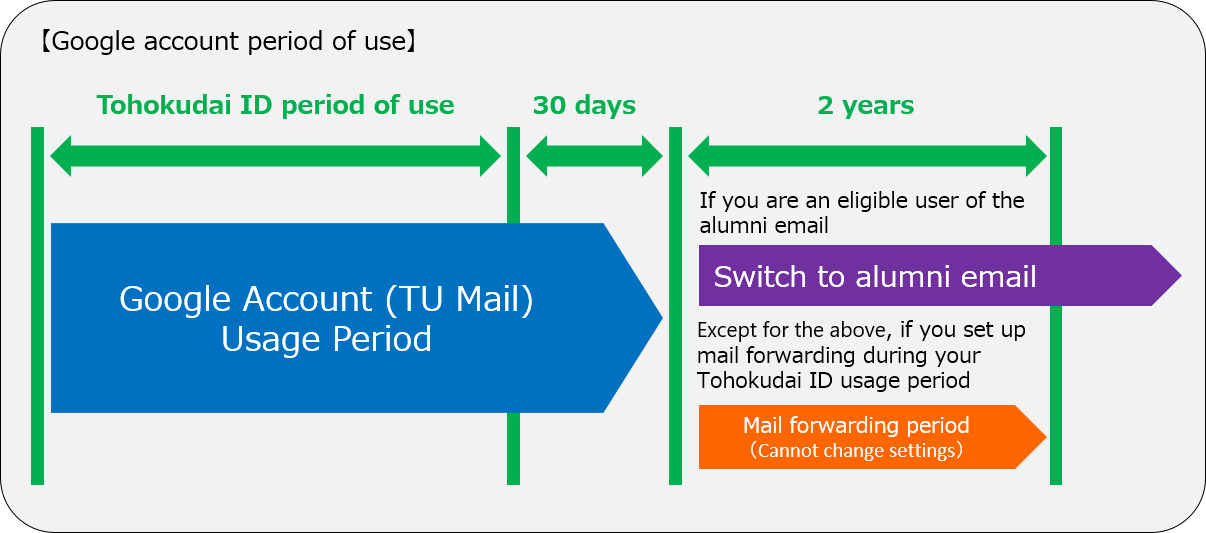
* Alumni mail can be used from April 2021. Please refer to the Shuyukai website for details such as the target users.
App availability
As of April 2020, the following Google Workspace for Education core services are available.
・Gmail
・Google Calendar
・Google Drive
・Google Groups for Business
・Chrome Sync
・Google Sites
・Google Hangouts
・Hangouts Chat
・Hangouts Meet
・Google Jamboard
・Google Keep
・Google Tasks
・Classroom
Services other than the above are called additional services, and data is handled
based on the general Google Terms of Service and service-specific Terms of Use.
For more detailed explanation, please see the Google Workspace help below.
Google Workspace for Education Core and Additional services
https://support.google.com/a/answer/6356441?hl=en
In response to the growing need for online classes as part of the fight against the spread of the new coronavirus (COVID-19), the following additional services are also available.
・YouTube
In addition, we have enabled the following services in response to requests for use in educational research, etc.
・Google Bard (Please agree to the terms of use and privacy before using.)
If you want to use other additional services, please see Google Workspace services extension aplication.
Guidelines
Please download from the link below.
・Internal Rules on the Use and Operation of TU Mail, etc., University E-mail for the Faculty and Staff at National University Corporation Tohoku University (On campus Only)
・Internal Rules on the Use and Operation of Google Workspace Storage at National University Corporation Tohoku University (On campus Only)
・Guidelines on the Use and Operation of Alias Addresses in TU Mail (On campus Only)
・Guidelines on the Use and Operation of Mailing Lists in TU Mail (On campus Only)
・Guidelines on the Use and Operation of Web Apps for TU Mail, etc. (On campus Only)
Storage
Due to a change in Google's policy regarding Google Workspace, our storage capacity is no longer unlimited, and we have just renewed the contract for a fee.
Therefore, for the purpose of proper storage management and restriction, we have formulated the Storage User Rules. So, we would appreciate your understanding and cooperation with the rules.
For more information
・Formulating of storage user rules due to Google Workspace contract renewal (Notice). (On campus Only)
・Google Workspace Storage User Rules (On campus Only)
Other
Current Mail systems
| Systems | Contents |
|---|---|
| Individual department mail service |
【E-mail Address not listed in this table】 Please inquire to each Individual department regarding department mail service. |
|
DC Mail (E-mail for student) |
【E-mail Address example:****@dc.tohoku.ac.jp】 DC Mail operates separately from TU Mail. From for information on DC Mail, please see the DC Mail website. |